Continua l’esplorazione archeoinformatica dei miei programmi in linguaggio BASIC sviluppati negli anni ’80 e ’90 su homecomputer di quell’epoca. Questa volta voglio raccontarvi di un programmino sviluppato per il microcomputer MSX1 Phillips VG8010 (commercializzato dalla Phillips nel 1984) durante gli ultimi anni di liceo e adattato successivamente al BASIC del mio primo e mitico calcolatore programmabile, il Texas Instruments TI-74 (la figura mostra il mio TI-74 tuttora ancora funzionante), durante i primi anni universitari.
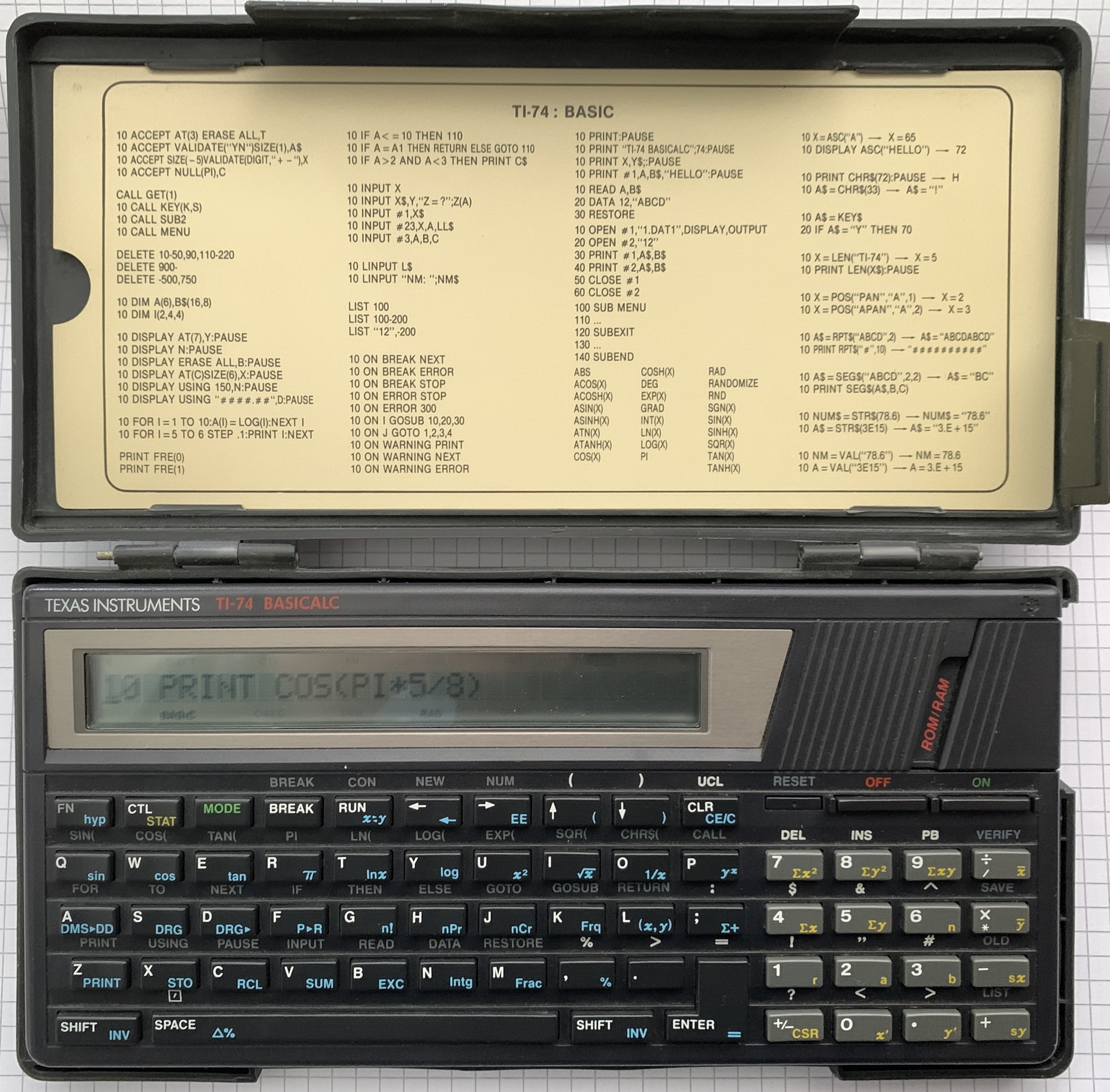
Il programma fu sviluppato con l’intento didattico di analizzare delle funzioni a una variabile in un intervallo definito dall’utente per poter rappresentare la funzione, le sue derivate e l’integrale graficamente, nonché individuarne numericamente le caratteristiche principali, quali le posizioni degli zeri, dei punti estremi e quelli di flesso.
Non avendo delle basi di analisi numerica, gli algoritmi numerici usati per queste analisi non erano molto sofisticati ed erano ispirati a rubriche lette sulla rivista più autorevole di cultura informatica italiana MC-Microcomputer di cui ero un assiduo lettore.
Inoltre MSX BASIC (prodotto dalla Microsoft) è un linguaggio con un set di comandi esteso rispetto al Commodore BASIC (anche questo prodotto dalla Microsoft) che avevo usato precedentemente. Tuttavia uno dei problemi che ho avuto fu la mancanza di un comando nel BASIC MSX che permettesse la valutazione di una stringa come una funzione. Un parser di questo tipo è disponibile solo in alcuni dialetti BASIC più avanzati, ad esempio nel BBC BASIC dei microcomputer dell’Acorn. Purtroppo scrivere all’epoca un parser in MSX BASIC non era semplice e anche inutile poiché sarebbe stato di lenta esecuzione non avendo un compilatore BASIC e non conoscendo l’assembler del processor Zilog Z80A usato nel computer. Per cui nella versione originale del programma la funzione doveva essere inserita nel programma modificandolo prima della sua esecuzione.
Come gli altri (retro-)progetti di questa serie, ho adattato il programma originario al linguaggio Microsoft QuickBasic implementato nel compilatore QB64 Phenix, migliorando gli algoritmi numerici e aggiungendo un’interfaccia grafica più elaborata. Il QB64 traduce il programma in BASIC in C, che viene quindi compilato, aumentando considerevolmente la velocità di esecuzione. Pertanto ho sviluppato un semplice parser per inserire la funzione da studiare come input, anziché nel codice sorgente. Di seguito fornisco una descrizione del programma e delle varie subroutine.
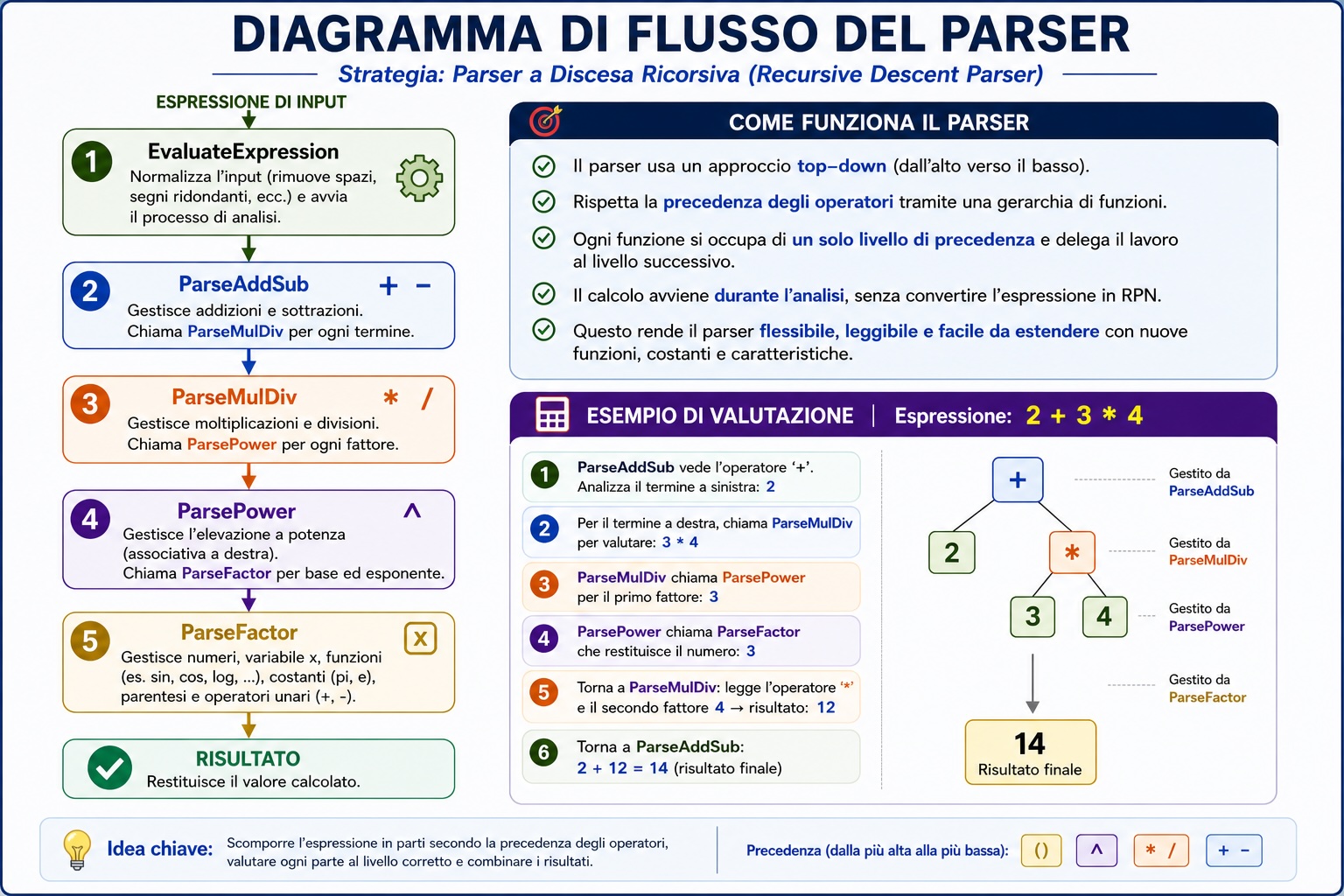
Grazie a ChatGPT, ho sviluppato un parser che consente di inserire la funzione matematica da analizzare direttamente come input da programma. La figura che segue illustra la struttura fondamentale del parser. Questo parser utilizza un approccio top-down e riconosce solo le operazioni aritmetiche fondamentali e alcune costanti, come il pi greco.
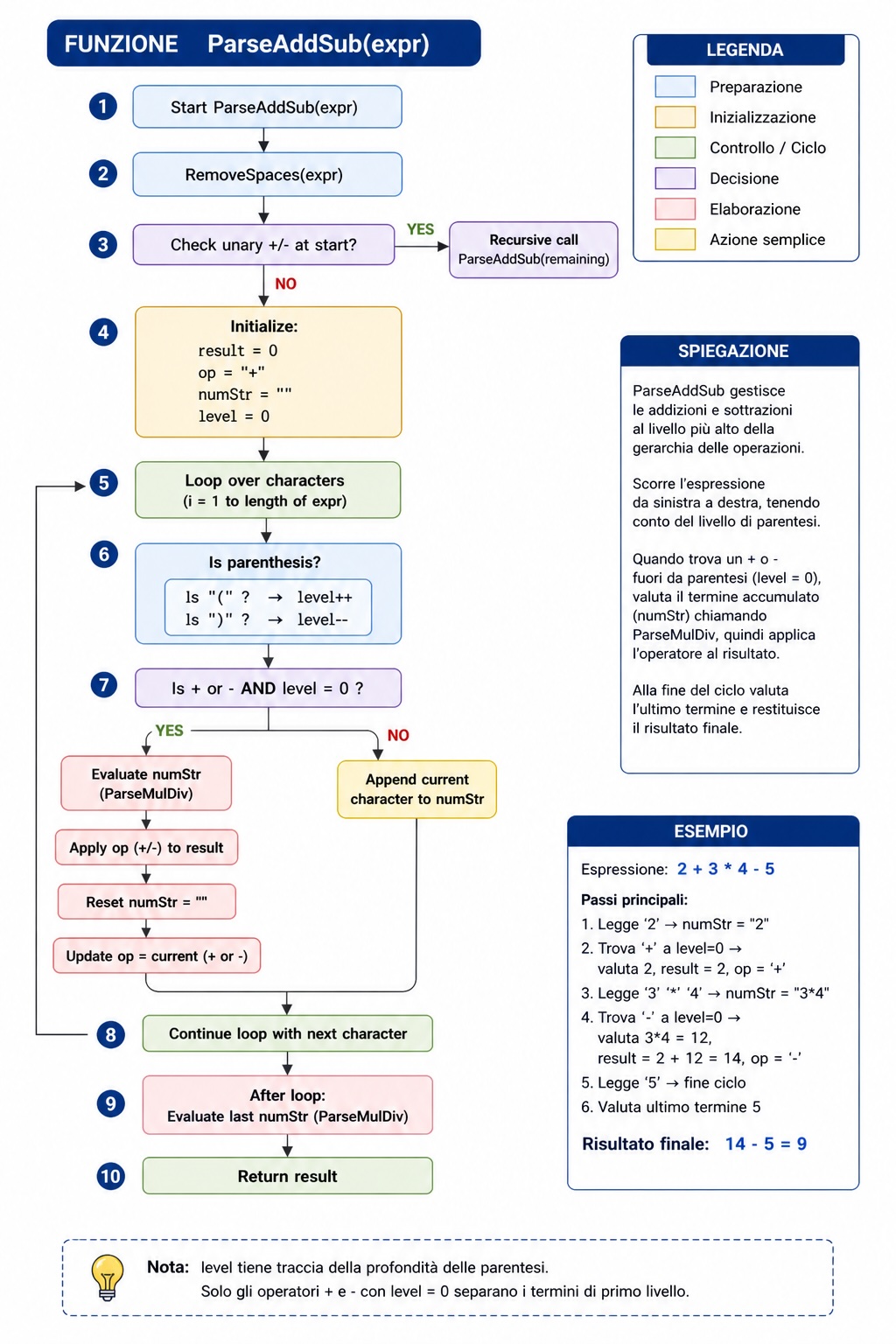
Il diagramma di flusso che segue illustra la funzione ParseAddSub, concepita per eseguire operazioni di addizione e sottrazione. Le altre funzioni seguono una struttura analoga.
Pur non avendo voluto dedicare troppo tempo alla creazione di un codice più sofisticato, l’espansione del parser non presenta particolari ostacoli.
Nella lista che segue sono invece riportate le principali subroutine usate per l’analisi numerica della funzione che si vuole studiare.
Derivata Prima Numerica (Derivative)
- Formulazione Matematica:
- Descrizione: Questo metodo della differenza centrale approssima la prima derivata di una funzione in un punto ( x ) con un piccolo passo ( h ).

Derivata Seconda (SecondDerivative)
- Formulazione Matematica:
- Descrizione: Questo metodo utilizza la formula della differenza centrale per approssimare la seconda derivata di una funzione in un punto ( x ) con un piccolo passo ( h ).

Integrazione Numerica (Integral)
- Formulazione Matematica:
- Descrizione: Questo metodo utilizza la regola di Simpson per l’integrazione numerica, dividendo l’intervallo ([a, b]) in ( N ) sottointervalli con larghezza ( h ).
![\int_{a}^{b} f(x) \, dx \approx \frac{h}{3} \left[ f(a) + f(b) + 4 \sum_{i=1,3,\ldots}^{N-1} f(a + ih) + 2 \sum_{i=2,4,\ldots}^{N-2} f(a + ih) \right]](https://s0.wp.com/latex.php?latex=%5Cint_%7Ba%7D%5E%7Bb%7D+f%28x%29+%5C%2C+dx+%5Capprox+%5Cfrac%7Bh%7D%7B3%7D+%5Cleft%5B+f%28a%29+%2B+f%28b%29+%2B+4+%5Csum_%7Bi%3D1%2C3%2C%5Cldots%7D%5E%7BN-1%7D+f%28a+%2B+ih%29+%2B+2+%5Csum_%7Bi%3D2%2C4%2C%5Cldots%7D%5E%7BN-2%7D+f%28a+%2B+ih%29+%5Cright%5D+&bg=ffffff&fg=444444&s=0&c=20201002)
Ricerca delle radici (RicercaRadici)
- Formulazione Matematica:
- Descrizione: Il metodo di Newton-Raphson approssima in modo iterativo una radice della funzione, partendo da un’ipotesi iniziale ( x_0 ) e usando la derivata della funzione per il raffinamento.

Trovare i Punti di Flessione (TrovarePuntiFlessione)
- Formulazione Matematica: Verifica dove cambia segno (
).
- Descrizione: Questo metodo identifica i punti in cui la seconda derivata cambia segno, indicando potenziali punti di flesso dove la concavità della funzione cambia.
Trova i Punti Critici (TrovaPuntiCritici)
- Formulazione Matematica: Risolvere (
).
- Descrizione: Questo metodo trova i punti in cui la prima derivata è zero, il che può indicare minimi locali, massimi o punti di sella.
Determinare la concavità (DeterminaConcavita)
- Formulazione Matematica: Analizza il segno di (
- Descrizione: Questo metodo valuta la seconda derivata per determinare gli intervalli in cui la funzione è convessa verso l’alto ( ( $latexf”(x) > 0 $ ) ) o convessa verso il basso ( (
) ).
Funzione di tracciamento (Funzione_di_Tracciamento)
- Descrizione: Questa subroutine traccia la funzione ( f(x) ) su una finestra grafica, disegnando l’asse x e l’asse y come riferimento e ridimensionando il grafico della funzione per adattarlo alle dimensioni della finestra.
IL RISULTATO
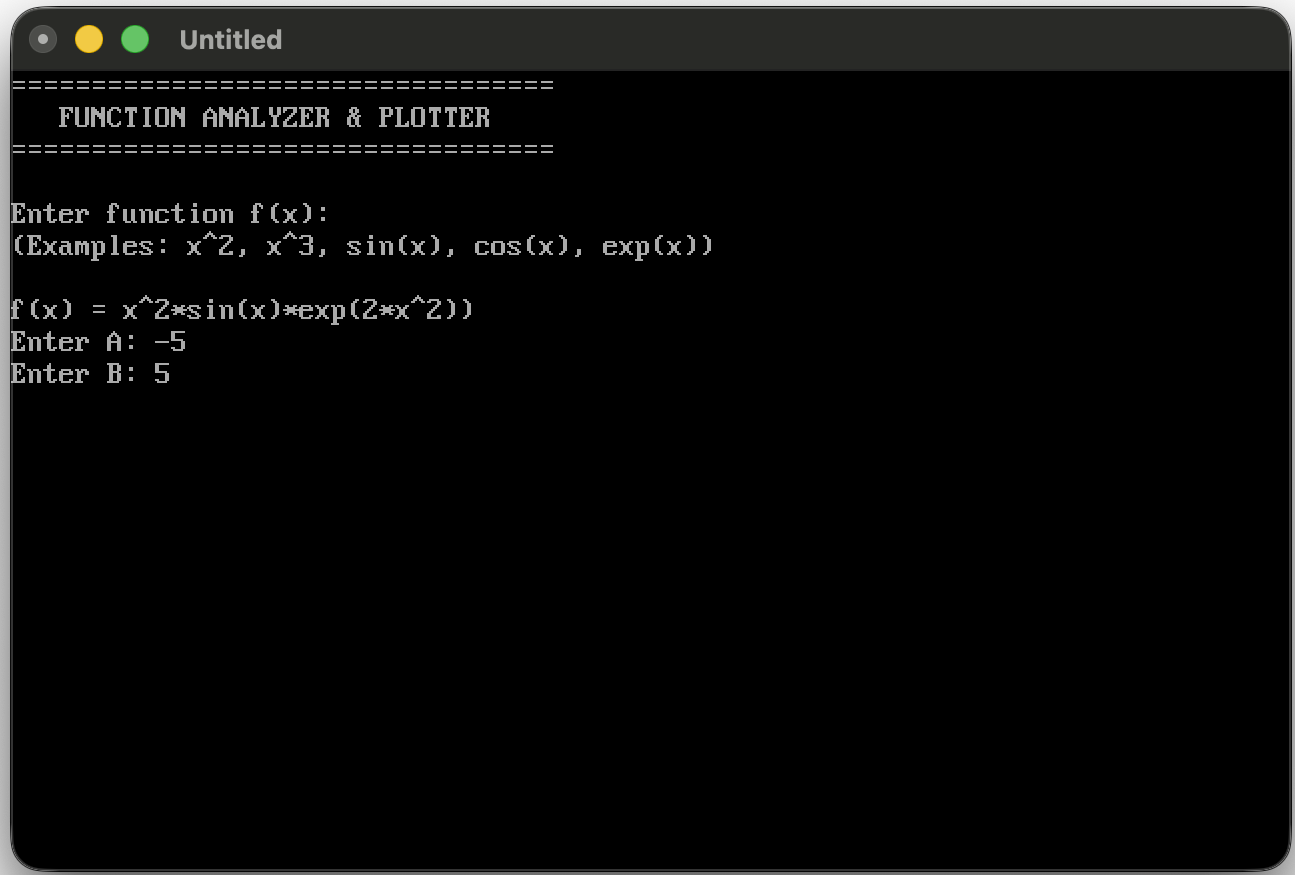
La Figura mostra la schermata di inserimento della funzione e dell’intervallo iniziale.
Quindi il programma disegna la funzione
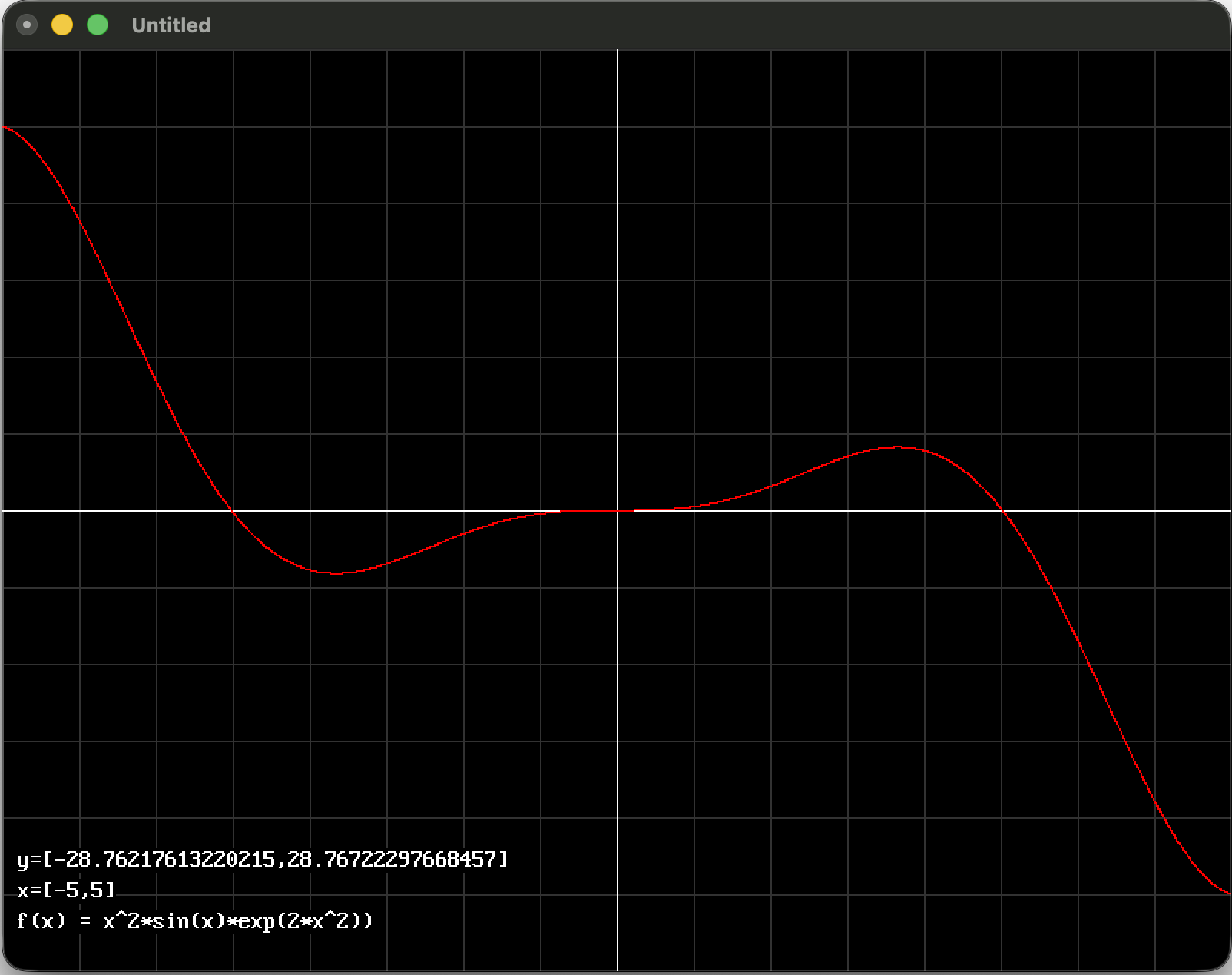
Inoltre, infine scrive a schermo le proprieta della funzione nell’intervallo selezionatoe richiese se cambiare l’intervallo.
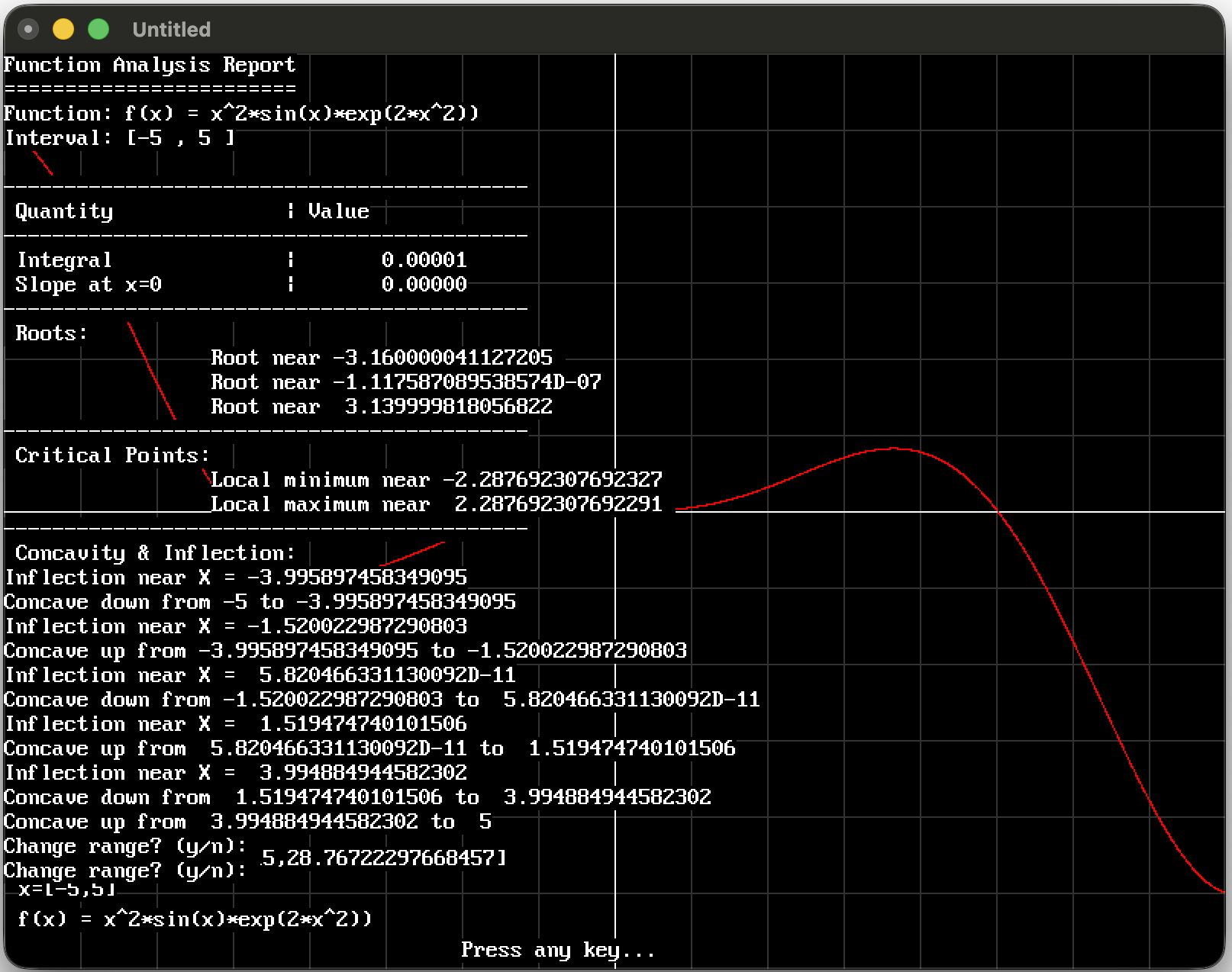
Il programma è disponibile nell’appendice per chi volesse provarlo o adattarlo ad altre versioni di linguaggio BASIC.
Questo progetto mostra come sia possibile costruire, anche in un linguaggio storico come BASIC/QB64, un piccolo ambiente di algebra computazionale capace di:
- interpretare espressioni matematiche inserite dall’utente;
- analizzare derivate, integrali e concavità;
- individuare punti critici e flessi;
- rappresentare graficamente le funzioni.
L’obiettivo non è soltanto ottenere un risultato numerico, ma anche comprendere la logica interna di un parser matematico ricorsivo e le tecniche numeriche utilizzate nell’analisi delle funzioni.
Il codice può essere facilmente esteso con:
- nuove funzioni matematiche;
- parser più avanzati basati su Reverse Polish Notation (RPN);
- algoritmi numerici di ordine superiore;
- esportazione grafica e interfacce interattive.
Spero che questo esempio possa essere utile sia a chi studia programmazione scientifica sia a chi desidera esplorare il funzionamento interno dei software di calcolo matematico.
APPENDICE
' ============================================================
' FUNCTION ANALYZER & PLOTTER
' QB64 Version
'
' A numerical and graphical tool for analyzing real functions.
'
' Features:
' - Custom expression parser (supports +, -, *, /, ^)
' - Built-in functions: sin, cos, tan, exp, log, abs, sqr
' - Graphical plotting with automatic scaling
' - Numerical derivative (1st and 2nd order)
' - 5-point stencil for high-accuracy second derivative
' - Root finding via sign-change detection
' - Critical points detection (f'(x) = 0)
' - Inflection points detection (f''(x) = 0)
' - Concavity analysis over intervals
' - Numerical integration (Simpsonâs rule)
'
' Numerical Methods:
' - Central finite differences
' - 5-point stencil (O(h^4)) for second derivative
' - Linear interpolation for zero-crossing refinement
'
' Usage:
' Enter a function f(x), and an interval [A, B].
' The program plots the function and generates a report.
'
' Example inputs:
' x^2
' x^3 - 3*x
' sin(x)
' exp(-x^2)
'
' Notes:
' - Accuracy depends on NUM_POINTS and step size
' - Very sharp or discontinuous functions may require tuning
'
' Version: 1.0 (QB64 Edition)
' Origin: Inspired by classic BASIC mathematical tools
'
' (c) 2026 Danilo Roccatano
' ============================================================
Dim Shared CurrentFunction$ ' Stores the user's function
Dim Shared COL As Integer
Dim Shared CurrentX As Double
COL = 18
Const NUM_POINTS = 500
Dim Shared A As Double, B As Double
Dim Shared Answer$
' Modified main loop
Do
Cls
Print "=================================="
Print " FUNCTION ANALYZER & PLOTTER"
Print "=================================="
Print
' Get function from user
Print "Enter function f(x):"
Print "(Examples: x^2, x^3, sin(x), cos(x), exp(x))"
Print
Line Input "f(x) = ", CurrentFunction$
' Validate input
If CurrentFunction$ = "" Then
Print "Using default: x^2"
CurrentFunction$ = "x^2"
End If
Input "Enter A: ", A
Input "Enter B: ", B
If B <> A Then
' --- GRAPH ---
Plot_Function A, B
' --- REPORT ---
PrintFunctionReport A, B
Else
Print "Error: A and B cannot be equal!"
Print "Press any key to continue..."
Sleep
End If
Answer$ = "n"
Do
Print "Change range? (y/n): ";
Line Input Answer$
Answer$ = LCase$(Answer$)
Loop While Answer$ = ""
Loop While LCase$(Answer$) = "y"
' ============= EXPRESSION PARSER =============
' Main FNF function
Function FNF (X)
FNF = EvaluateExpression(CurrentFunction$, X)
End Function
' Evaluate expression
Function EvaluateExpression (func$, x)
Dim expr$, result As Double
' Convert to lowercase for consistent parsing
expr$ = LCase$(func$)
CurrentX = x
' Normalize signs
expr$ = NormalizeSigns(expr$)
' Parse the expression
result = ParseAddSub(expr$)
EvaluateExpression = result
End Function
' Convert D to E in scientific notation
Function ConvertScientificNotation$ (numStr$)
Dim i As Integer
Dim result$, ch$
result$ = ""
i = 1
While i <= Len(numStr$)
ch$ = Mid$(numStr$, i, 1)
If ch$ = "D" Or ch$ = "d" Then
result$ = result$ + "E"
Else
result$ = result$ + ch$
End If
i = i + 1
Wend
ConvertScientificNotation$ = result$
End Function
' Normalize signs (+, -, etc.)
Function NormalizeSigns$ (expr$)
Dim oldExpr$
Do
oldExpr$ = expr$
' Remove double negatives
expr$ = ReplaceString(expr$, "--", "+")
' Handle +- and -+
expr$ = ReplaceString(expr$, "+-", "-")
expr$ = ReplaceString(expr$, "-+", "-")
' Handle multiple plus signs
expr$ = ReplaceString(expr$, "++", "+")
Loop While expr$ <> oldExpr$
NormalizeSigns$ = expr$
End Function
' Simple string replace function
Function ReplaceString$ (txt$, find$, repl$)
Dim posi As Integer
Dim result$
result$ = txt$
posi = InStr(result$, find$)
While posi > 0
result$ = Left$(result$, posi - 1) + repl$ + Mid$(result$, posi + Len(find$))
posi = InStr(posi + Len(repl$), result$, find$)
Wend
ReplaceString$ = result$
End Function
' Remove spaces
Function RemoveSpaces$ (expr$)
Dim result$, i As Integer
result$ = ""
For i = 1 To Len(expr$)
If Mid$(expr$, i, 1) <> " " Then
result$ = result$ + Mid$(expr$, i, 1)
End If
Next
RemoveSpaces$ = result$
End Function
' Parse addition and subtraction
Function ParseAddSub (expr$)
Dim i As Integer
Dim result As Double
Dim op$, numStr$, num As Double
Dim level As Integer
expr$ = RemoveSpaces(expr$)
' Handle unary minus at start
If Left$(expr$, 1) = "-" Then
ParseAddSub = -ParseAddSub(Mid$(expr$, 2))
Exit Function
End If
If Left$(expr$, 1) = "+" Then
ParseAddSub = ParseAddSub(Mid$(expr$, 2))
Exit Function
End If
result = 0
op$ = "+"
numStr$ = ""
level = 0
For i = 1 To Len(expr$)
Dim ch$
ch$ = Mid$(expr$, i, 1)
Select Case ch$
Case "("
level = level + 1
numStr$ = numStr$ + ch$
Case ")"
level = level - 1
numStr$ = numStr$ + ch$
Case "+", "-"
If level = 0 Then
If numStr$ <> "" Then
num = ParseMulDiv(numStr$)
If op$ = "+" Then
result = result + num
Else
result = result - num
End If
numStr$ = ""
End If
op$ = ch$
Else
numStr$ = numStr$ + ch$
End If
Case Else
numStr$ = numStr$ + ch$
End Select
Next
' Last term
If numStr$ <> "" Then
num = ParseMulDiv(numStr$)
If op$ = "+" Then
result = result + num
Else
result = result - num
End If
End If
ParseAddSub = result
End Function
' Parse multiplication and division
Function ParseMulDiv (expr$)
Dim i As Integer
Dim result As Double
Dim op$, numStr$, num As Double
Dim level As Integer
expr$ = RemoveSpaces(expr$)
result = 1
op$ = "*"
numStr$ = ""
level = 0
For i = 1 To Len(expr$)
Dim ch$
ch$ = Mid$(expr$, i, 1)
Select Case ch$
Case "("
level = level + 1
numStr$ = numStr$ + ch$
Case ")"
level = level - 1
numStr$ = numStr$ + ch$
Case "*", "/"
If level = 0 Then
If numStr$ <> "" Then
num = ParsePower(numStr$)
If op$ = "*" Then
result = result * num
Else
If num <> 0 Then
result = result / num
Else
result = 1E+308
End If
End If
numStr$ = ""
End If
op$ = ch$
Else
numStr$ = numStr$ + ch$
End If
Case Else
numStr$ = numStr$ + ch$
End Select
Next
' Last factor
If numStr$ <> "" Then
num = ParsePower(numStr$)
If op$ = "*" Then
result = result * num
Else
If num <> 0 Then
result = result / num
End If
End If
End If
ParseMulDiv = result
End Function
' Parse exponentiation
Function ParsePower (expr$)
Dim i As Integer
Dim result As Double
Dim level As Integer
expr$ = RemoveSpaces(expr$)
level = 0
' Find exponent operator (right to left for power)
For i = Len(expr$) To 1 Step -1
Dim ch$
ch$ = Mid$(expr$, i, 1)
Select Case ch$
Case ")"
level = level + 1
Case "("
level = level - 1
Case "^"
If level = 0 Then
Dim leftExpr$, rightExpr$
leftExpr$ = Left$(expr$, i - 1)
rightExpr$ = Mid$(expr$, i + 1)
ParsePower = ParsePower(leftExpr$) ^ ParsePower(rightExpr$)
Exit Function
End If
End Select
Next
ParsePower = ParseFactor(expr$)
End Function
' Parse numbers, functions, and parentheses
Function ParseFactor (expr$)
Dim result As Double
expr$ = RemoveSpaces(expr$)
If expr$ = "x" Then
ParseFactor = CurrentX
Exit Function
End If
' Handle unary minus
If Left$(expr$, 1) = "-" Then
ParseFactor = -ParseFactor(Mid$(expr$, 2))
Exit Function
End If
' Handle unary plus
If Left$(expr$, 1) = "+" Then
ParseFactor = ParseFactor(Mid$(expr$, 2))
Exit Function
End If
' Remove outer parentheses
If Left$(expr$, 1) = "(" And Right$(expr$, 1) = ")" Then
ParseFactor = ParseAddSub(Mid$(expr$, 2, Len(expr$) - 2))
Exit Function
End If
' Constants
If expr$ = "pi" Then
ParseFactor = 3.141592653589793##
Exit Function
End If
If expr$ = "e" Then
ParseFactor = 2.718281828459045##
Exit Function
End If
' Check for functions
If Left$(expr$, 3) = "sin" Then
If Len(expr$) > 4 And Mid$(expr$, 4, 1) = "(" Then
ParseFactor = Sin(ParseAddSub(Mid$(expr$, 5, Len(expr$) - 5)))
Else
ParseFactor = Sin(ParseAddSub(Mid$(expr$, 4)))
End If
ElseIf Left$(expr$, 3) = "cos" Then
If Len(expr$) > 4 And Mid$(expr$, 4, 1) = "(" Then
ParseFactor = Cos(ParseAddSub(Mid$(expr$, 5, Len(expr$) - 5)))
Else
ParseFactor = Cos(ParseAddSub(Mid$(expr$, 4)))
End If
ElseIf Left$(expr$, 3) = "tan" Then
If Len(expr$) > 4 And Mid$(expr$, 4, 1) = "(" Then
ParseFactor = Tan(ParseAddSub(Mid$(expr$, 5, Len(expr$) - 5)))
Else
ParseFactor = Tan(ParseAddSub(Mid$(expr$, 4)))
End If
ElseIf Left$(expr$, 3) = "exp" Then
If Len(expr$) > 4 And Mid$(expr$, 4, 1) = "(" Then
ParseFactor = Exp(ParseAddSub(Mid$(expr$, 5, Len(expr$) - 5)))
Else
ParseFactor = Exp(ParseAddSub(Mid$(expr$, 4)))
End If
ElseIf Left$(expr$, 3) = "log" Then
If Len(expr$) > 4 And Mid$(expr$, 4, 1) = "(" Then
ParseFactor = Log(ParseAddSub(Mid$(expr$, 5, Len(expr$) - 5)))
Else
ParseFactor = Log(ParseAddSub(Mid$(expr$, 4)))
End If
ElseIf Left$(expr$, 3) = "abs" Then
If Len(expr$) > 4 And Mid$(expr$, 4, 1) = "(" Then
ParseFactor = Abs(ParseAddSub(Mid$(expr$, 5, Len(expr$) - 5)))
Else
ParseFactor = Abs(ParseAddSub(Mid$(expr$, 4)))
End If
ElseIf Left$(expr$, 3) = "sqr" Then
If Len(expr$) > 4 And Mid$(expr$, 4, 1) = "(" Then
Dim tempVal As Double
tempVal = ParseAddSub(Mid$(expr$, 5, Len(expr$) - 5))
If tempVal >= 0 Then
ParseFactor = Sqr(tempVal)
Else
ParseFactor = 0
End If
Else
ParseFactor = Sqr(ParseAddSub(Mid$(expr$, 4)))
End If
Else
' Just a number
result = Val(expr$)
' If Val returns 0 but string isn't "0", try manual conversion
If result = 0 And expr$ <> "0" And expr$ <> "0.0" Then
result = ConvertNumber(expr$)
End If
ParseFactor = result
End If
End Function
' Convert number with scientific notation
Function ConvertNumber (numStr$)
Dim ePos As Integer
Dim mantissa$, exponent$
' Handle scientific notation (E notation)
ePos = InStr(numStr$, "E")
If ePos = 0 Then
ePos = InStr(numStr$, "e")
End If
If ePos > 0 Then
mantissa$ = Left$(numStr$, ePos - 1)
exponent$ = Mid$(numStr$, ePos + 1)
ConvertNumber = Val(mantissa$) * (10 ^ Val(exponent$))
Else
ConvertNumber = Val(numStr$)
End If
End Function
' ============= ANALYSIS FUNCTIONS =============
' Calculate the derivative using central difference method
Function Derivative (X, H)
Derivative = (FNF(X + H) - FNF(X - H)) / (2 * H)
End Function
' Calculate the second derivative
Function SecondDerivative (X, H)
SecondDerivative = (FNF(X + H) - 2 * FNF(X) + FNF(X - H)) / (H ^ 2)
End Function
Function SecondDerivative5 (X As Double, H As Double)
SecondDerivative5 = (-FNF(X + 2 * H) _
+ 16 * FNF(X + H) _
- 30 * FNF(X) _
+ 16 * FNF(X - H) _
- FNF(X - 2 * H)) / (12 * H ^ 2)
End Function
' Calculate the integral using Simpson's rule
Function Integrale (A, B)
Dim N As Integer
Dim H As Double, X As Double
Dim Sum As Double
N = NUM_POINTS
H = (B - A) / N
Sum = FNF(A) + FNF(B)
For X = A + H To B - H Step 2 * H
Sum = Sum + 4 * FNF(X)
Next
For X = A + 2 * H To B - 2 * H Step 2 * H
Sum = Sum + 2 * FNF(X)
Next
Sum = Sum * H / 3
Integrale = Sum
End Function
' Find roots
Sub FindRoots (A, B)
Dim X As Double, H As Double
Dim F1 As Double, F2 As Double
H = (B - A) / NUM_POINTS
For X = A To B - H Step H
F1 = FNF(X)
F2 = FNF(X + H)
If F1 * F2 < 0 Then
Locate , COL: Print "Root near "; X
End If
Next
End Sub
Sub FindCriticalPoints (A As Double, B As Double)
Dim X As Double, H As Double
Dim D1Prev As Double, D1Curr As Double
Dim Xcrit As Double
Const EPS = 1E-5
H = (B - A) / NUM_POINTS
D1Prev = Derivative(A, 1E-5)
For X = A + H To B Step H
D1Curr = Derivative(X, 1E-5)
' Filter noise
If Abs(D1Prev) < EPS Then D1Prev = 0
If Abs(D1Curr) < EPS Then D1Curr = 0
' Detect sign change
If D1Prev * D1Curr < 0 Then
' Linear interpolation (same idea as inflection)
Xcrit = X - D1Curr * H / (D1Curr - D1Prev)
' Classification using second derivative
Dim D2 As Double
D2 = SecondDerivative5(Xcrit, (B - A) / 1000)
If D2 > EPS Then
Locate , COL: Print "Local minimum near "; Xcrit
ElseIf D2 < -EPS Then
Locate , COL: Print "Local maximum near "; Xcrit
Else
Locate , COL: Print "Flat critical point near "; Xcrit
End If
End If
D1Prev = D1Curr
Next
End Sub
Function AnalyzeConcavity$ (A, B)
Dim X As Double, H As Double
Dim D2Prev As Double, D2Curr As Double
Dim statePrev As Integer, stateCurr As Integer
Dim startX As Double
Dim result$
Dim Xinf As Double
Const EPS = 1E-2
H = (B - A) / NUM_POINTS
' initial second derivative
D2Prev = SecondDerivative5(A + 2 * H, (B - A) / 1000)
If Abs(D2Prev) < EPS Then
statePrev = 0
ElseIf D2Prev > 0 Then
statePrev = 1
Else
statePrev = -1
End If
startX = A
For X = A + 2 * H To B - 2 * H Step H
D2Curr = SecondDerivative5(X, (B - A) / 1000)
' classify
If Abs(D2Curr) < EPS Then
stateCurr = 0
ElseIf D2Curr > 0 Then
stateCurr = 1
Else
stateCurr = -1
End If
' === DETECT INFLECTION ===
If statePrev * stateCurr < 0 Then
' linear interpolation
Xinf = X - D2Curr * H / (D2Curr - D2Prev)
result$ = result$ + "Inflection near X = " + Str$(Xinf) + Chr$(13)
' close previous interval
If statePrev = 1 Then
result$ = result$ + "Concave up from " + Str$(startX) + " to " + Str$(Xinf) + Chr$(13)
ElseIf statePrev = -1 Then
result$ = result$ + "Concave down from " + Str$(startX) + " to " + Str$(Xinf) + Chr$(13)
End If
startX = Xinf
End If
If stateCurr <> 0 Then statePrev = stateCurr
D2Prev = D2Curr
Next
' final interval
If statePrev = 1 Then
result$ = result$ + "Concave up from " + Str$(startX) + " to " + Str$(B)
ElseIf statePrev = -1 Then
result$ = result$ + "Concave down from " + Str$(startX) + " to " + Str$(B)
End If
If result$ = "" Then
result$ = "No concavity changes detected"
End If
AnalyzeConcavity$ = result$
End Function
' Slope at a point
Function SlopeAtPoint (X)
SlopeAtPoint = Derivative(X, 1E-5)
End Function
' Function to generate report
Sub PrintFunctionReport (A, B)
Dim IntegralValue As Double, TangentSlope As Double
Dim ConcavityText As String
' Calculate values
IntegralValue = Integrale(A, B)
TangentSlope = SlopeAtPoint(0)
' Switch to text mode
' Screen 0
' Width 80, 25
'Cls
' Print the report
Print "Function Analysis Report"
Print "========================"
Print "Function: f(x) = "; CurrentFunction$
Print "Interval: ["; A; ","; B; "]"
Print
Print "-------------------------------------------"
Print " Quantity | Value"
Print "-------------------------------------------"
Print Using " Integral | #######.#####"; IntegralValue
Print Using " Slope at x=0 | #######.#####"; TangentSlope
Print "-------------------------------------------"
Print " Roots:"
FindRoots A, B
Print "-------------------------------------------"
Print " Critical Points:"
FindCriticalPoints A, B
Print "-------------------------------------------"
Print " Concavity & Inflection:"
Print AnalyzeConcavity$(A, B)
'Print
'Print "Press any key to continue..."
'Sleep
End Sub
' Plot the function
Sub Plot_Function (A, B)
Screen _NewImage(800, 600, 32)
Cls
Dim X As Double, Y As Double
Dim SX As Integer, SY As Integer
Dim ScaleX As Double, ScaleY As Double
Dim MinY As Double, MaxY As Double
Dim i As Integer
Dim SampleStep As Double
If B = A Then Exit Sub
' X scaling
ScaleX = 799 / (B - A)
' Find Y range
MinY = 1E+308
MaxY = -1E+308
SampleStep = (B - A) / 5000
For X = A To B Step SampleStep
Y = FNF(X)
If Y < MinY And Y > -1E6 Then MinY = Y
If Y > MaxY And Y < 1E6 Then MaxY = Y
Next
' Validate range
If MinY >= MaxY Then
MinY = -10
MaxY = 10
End If
' Add padding
Dim YRange As Double
YRange = MaxY - MinY
If YRange > 0 Then
MinY = MinY - 0.1 * YRange
MaxY = MaxY + 0.1 * YRange
End If
' Y scaling
ScaleY = 599 / (MaxY - MinY)
' Draw grid
For i = 0 To 799 Step 50
Line (i, 0)-(i, 599), _RGB(50, 50, 50)
Next
For i = 0 To 599 Step 50
Line (0, i)-(799, i), _RGB(50, 50, 50)
Next
' Draw axes
Dim X0 As Integer, Y0 As Integer
If MinY <= 0 And MaxY >= 0 Then
Y0 = 599 - (0 - MinY) * ScaleY
If Y0 >= 0 And Y0 <= 599 Then
Line (0, Y0)-(799, Y0), _RGB(255, 255, 255)
End If
End If
If A <= 0 And B >= 0 Then
X0 = (0 - A) * ScaleX
If X0 >= 0 And X0 <= 799 Then
Line (X0, 0)-(X0, 599), _RGB(255, 255, 255)
End If
End If
' Draw function
Dim PrevX As Integer, PrevY As Integer
Dim FirstPoint As Integer
FirstPoint = -1
For X = A To B Step SampleStep
Y = FNF(X)
SX = (X - A) * ScaleX
SY = 599 - (Y - MinY) * ScaleY
If SX >= 0 And SX <= 799 And SY >= 0 And SY <= 599 Then
If FirstPoint = -1 Then
PSet (SX, SY), _RGB(255, 0, 0)
PrevX = SX
PrevY = SY
FirstPoint = 0
Else
If Abs(SY - PrevY) < 100 Then
Line (PrevX, PrevY)-(SX, SY), _RGB(255, 0, 0)
Else
FirstPoint = -1
End If
PrevX = SX
PrevY = SY
End If
Else
FirstPoint = -1
End If
Next
' Display info
_PrintString (10, 560), "f(x) = " + CurrentFunction$
_PrintString (10, 540), "x=[" + LTrim$(Str$(A)) + "," + LTrim$(Str$(B)) + "]"
_PrintString (10, 520), "y=[" + LTrim$(Str$(MinY)) + "," + LTrim$(Str$(MaxY)) + "]"
_Display
_PrintString (300, 580), "Press any key..."
Sleep
End Sub


